

As powerful the Browser Use feature in ChatGPT and Claude is - it’s also the most impractical.
I run out of tokens very quickly compared to some large coding tasks I use the agents for.
This is partly tied to the way these agents can access the webpages. They either take a screenshot of the pages and parse, or scrape the DOM and parse the full pages.
Either way they devour tokens.
That’s why I was curious to know more about WebMCP.
And, it seems it might be the solution to the problem I stated above.
Full analysis in the video.
WebMCP lets a website register real, callable functions that an AI agent can invoke directly. No parsing, no reverse-engineering pixels.
If you want to enable WebMCP on your pages you need to simply add a method in your JS script or file.
await document.modelContext.registerTool({
  name: 'search_products',
  description: 'Search the site catalog by keyword',
  inputSchema: {
    type: 'object',
    properties: { query: { type: 'string' } },
    required: ['query'],
  },
  execute: async ({ query }) => {
    return await searchCatalog(query);
  },
});
Think of this as the tool decorator you add on the python functions.
Give it a name, description, input object and the execute function that “calls” the tool.
document.modelContext.registerToolThe Implementation
Lets say you have an ecommerce page that looked like this.
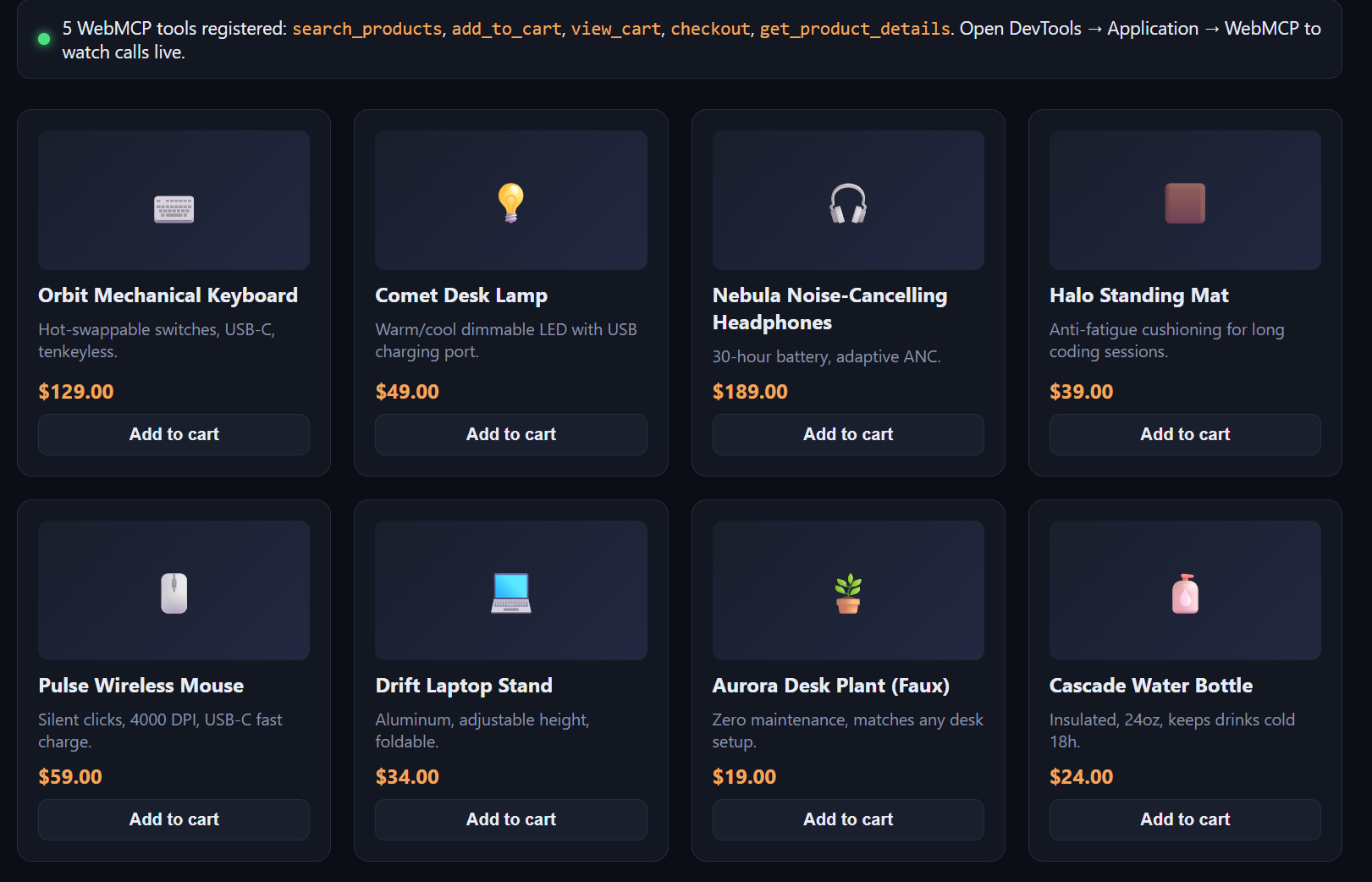
You can add all the operations on page as tools that you want the agents to use.
async function registerWebMcpTools() {
  if (!('modelContext' in document)) {
    setStatus(false,
      'WebMCP not detected in this browser. Enable <code>chrome://flags/#enable-webmcp-testing</code> ' +
      '(Chromium 146.0.7672.0+) and reload, or check developer.chrome.com/docs/ai/webmcp — this API is ' +
      'still an early preview and its enable-steps can change.'
    );
    return;
  }

  await document.modelContext.registerTool({
    name: 'search_products',
    description: 'Search the Comet Goods catalog by product name or keyword. Returns matching products with id, name, price, and description.',
    inputSchema: {
      type: 'object',
      properties: { query: { type: 'string', description: 'Keyword to search for, e.g. "headphones" or "lamp"' } },
      required: ['query'],
    },
    execute: async ({ query }) => {
      const results = searchProducts(query);
      logToolCall('search_products', { query }, { resultCount: results.length });
      return { results };
    },
  });

  await document.modelContext.registerTool({
    name: 'add_to_cart',
    description: 'Add a product to the shopping cart by its product id and quantity.',
    inputSchema: {
      type: 'object',
      properties: {
        productId: { type: 'string', description: 'The product id, e.g. "p1"' },
        quantity: { type: 'number', description: 'How many to add. Defaults to 1.' },
      },
      required: ['productId'],
    },
    execute: async ({ productId, quantity }) => {
      const result = addToCart(productId, quantity || 1);
      logToolCall('add_to_cart', { productId, quantity: quantity || 1 }, result);
      return result;
    },
  });

}
I couldn’t find a working WebMCP client to test so I wrote a custom one using Playwright.
class WebMCPClient:
    def __init__(self, page: Page):
        self.page = page

    def list_tools(self) -> list[dict]:
        print("-"*40)
        print("Listing registered WebMCP tools...")
        print("-"*40)
        tools = self.page.evaluate(
            """async () => {
                const tools = await document.modelContext.getTools();
                return tools.map(t => ({
                    name: t.name,
                    description: t.description,
                    inputSchema: JSON.parse(t.inputSchema),
                }));
            }"""
        )
        return tools

    def call_tool(self, name: str, arguments: dict) -> dict:
        print("-"*40)
        print(f"Calling tool {name} with arguments: {arguments}")
        print("-"*40)
        raw = self.page.evaluate(
            """async ([toolName, argsJson]) => {
                const tools = await document.modelContext.getTools();
                const tool = tools.find(t => t.name === toolName);
                if (!tool) throw new Error(`No such tool: ${toolName}`);
                return await document.modelContext.executeTool(tool, argsJson);
            }""",
            [name, json.dumps(arguments)],
        )
        try:
            return json.loads(raw)
        except (TypeError, json.JSONDecodeError):
            return raw
Below are some logs from the agent run.
Registered WebMCP tools:
----------------------------------------
Listing registered WebMCP tools...
----------------------------------------
  - add_to_cart: Add a product to the shopping cart by its product id and quantity.
  - checkout: Place an order for everything currently in the cart. This is a consequential action and will ask the user to confirm.
  - get_product_details: Get full details for a single product by id.
  - search_products: Search the Comet Goods catalog by product name or keyword. Returns matching products with id, name, price, and description.
  - view_cart: Get the current contents of the shopping cart, including line items and total price.

search_products('keyboard'):
----------------------------------------
Calling tool search_products with arguments: {'query': 'keyboard'}
----------------------------------------
  {'results': [{'id': 'p1', 'name': 'Orbit Mechanical Keyboard', 'price': 129, 'description': 'Hot-swappable switches, USB-C, tenkeyless.'}]}

add_to_cart(p1, 3):
----------------------------------------
Calling tool add_to_cart with arguments: {'productId': 'p1', 'quantity': 3}
----------------------------------------
  {'ok': True, 'message': 'Added 3 × Orbit Mechanical Keyboard to cart', 'cartCount': 3}

get_product_details(p3):
----------------------------------------
Calling tool get_product_details with arguments: {'productId': 'p3'}
----------------------------------------
  {'id': 'p3', 'name': 'Nebula Noise-Cancelling Headphones', 'price': 189, 'description': '30-hour battery, adaptive ANC.'}
Where it stands currently
It isn’t production-ready - and should not be used in production by you as well.
It has moved into a formal Origin Trial.
Key Takeaways
WebMCP lets a page register real, callable functions for AI Agents using document.modelContext.registerTool
It’s not an implementation of Anthropics Model Context Protocol
It’s designed for a human-in-the-loop browser tab, not headless background
It’s early: a Chrome Origin Trial, and explicitly not production-ready yet