

If you’ve built an MCP client with dozens—or hundreds—of tools, you’ve probably run into the same question:
How do you prevent the model from drowning in tool definitions?
The answer is Progressive Discovery.
Instead of exposing every tool upfront, the client progressively reveals only the tools needed to solve the user’s request.
Let’s see how it works.
The Problem: Every Tool, Every Time
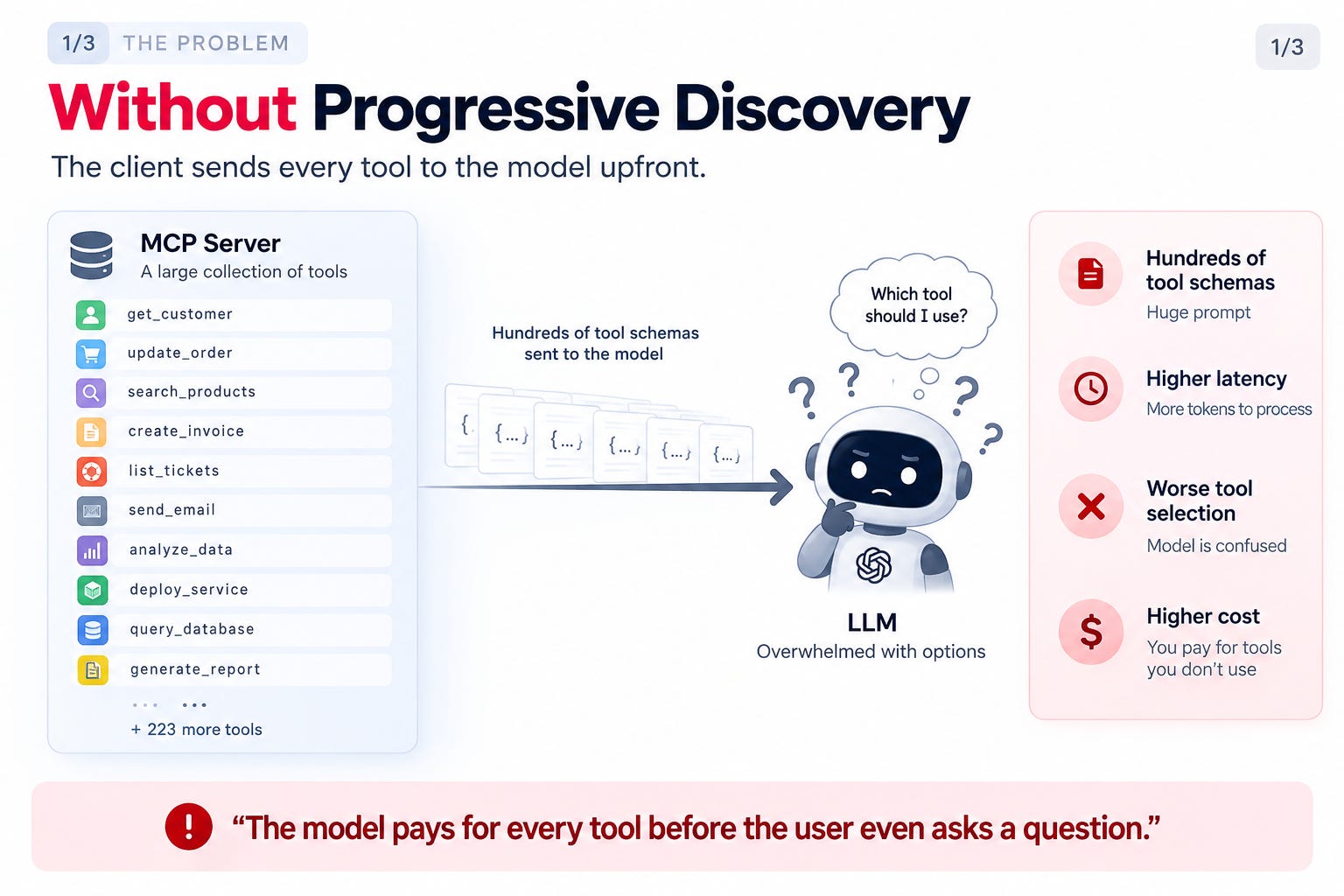
Imagine your MCP client is connected to Salesforce, GitHub, Slack, Google Drive, Stripe, Notion, and dozens of other services.
The traditional approach is straightforward:
Load every tool schema.
Send them all to the LLM.
Let the model figure out which one to use.
That means the model receives hundreds of tool definitions before it has even processed the user’s request.
A simple question like:
“Update the Salesforce lead for Acme Corp.”
still forces the model to inspect Slack tools, GitHub tools, Google Drive tools, Stripe tools, and everything else.
Most of those tools are irrelevant.
The result?
Larger prompts
Higher token usage
Increased latency
More expensive requests
Harder tool selection
The bigger your MCP ecosystem becomes, the worse this problem gets.
The Solution: Progressive Discovery
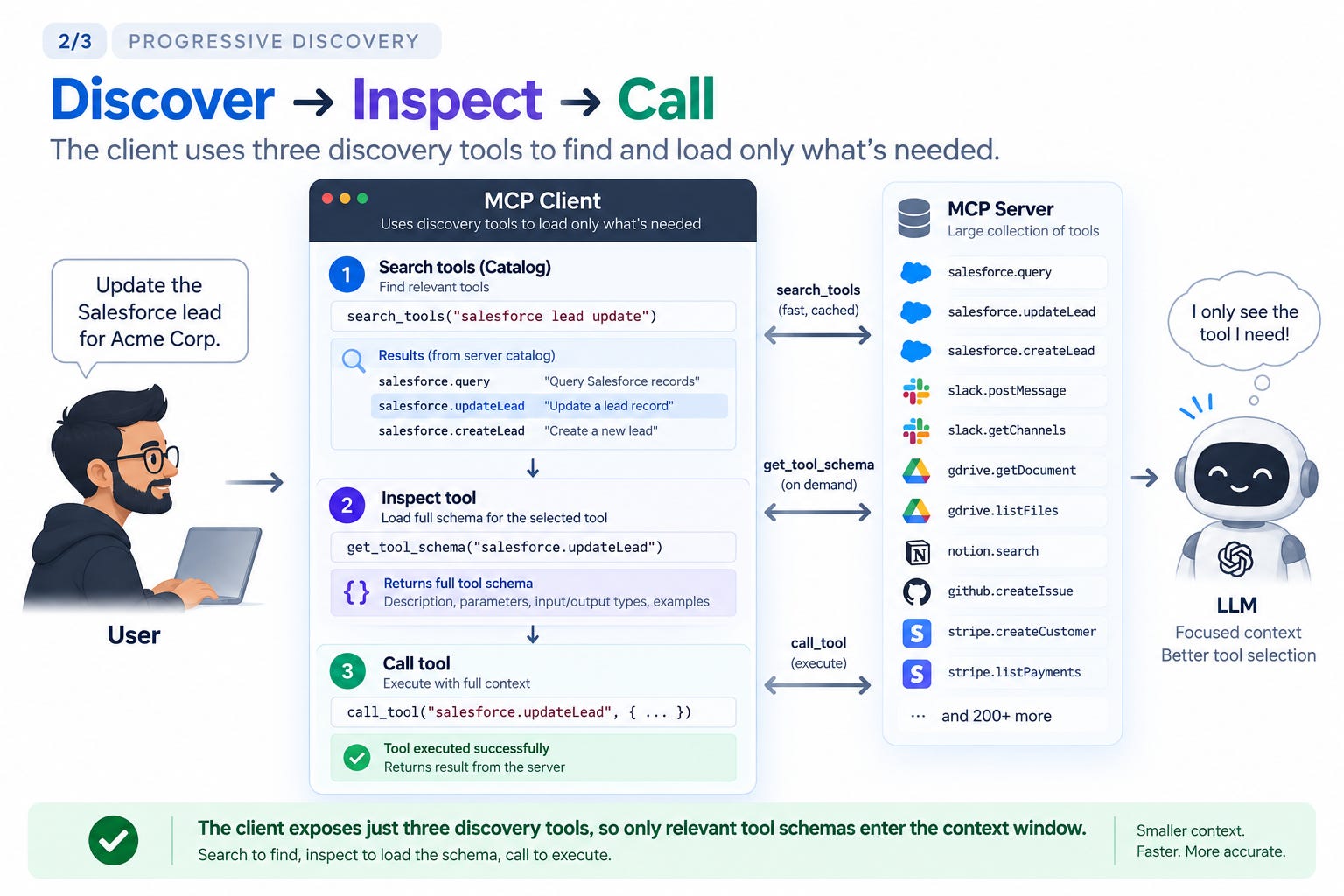
Instead of exposing hundreds of business tools, the client exposes only three discovery tools:
Search – Find relevant tools
Inspect – Load a tool’s schema
Call – Execute the selected tool
The interaction becomes incremental.
The model first searches the available catalog:
“Find tools related to Salesforce lead updates.”
The client returns only matching tools.
The model then requests the schema for the one it wants to use.
Only that schema is loaded into context.
Finally, the model executes the tool.
Rather than loading 200 tool definitions upfront, the model learns about exactly one tool when it needs it.
Same Capability. Much Smaller Context.
One of the biggest misconceptions is that Progressive Discovery reduces what the model can do.
It doesn’t.
The model still has access to every tool connected to the MCP client.
The difference is when those tools are introduced.
Instead of carrying hundreds of unused schemas inside the context window, the model only receives the definitions required for the current task.
This produces several practical benefits:
Smaller prompts
Lower token consumption
Faster responses
Better tool selection
Support for much larger tool ecosystems
The capability remains identical.
The context becomes dramatically smaller.
The Complete Agent Loop
Here’s what actually happens during execution.
1. Application starts
The MCP client connects to its servers, downloads the available tool catalog, and caches it locally.
Nothing is sent to the model yet.
2. User submits a request
For example:
“Update the Salesforce lead for Acme Corp.”
3. The harness prepares the prompt
Instead of sending hundreds of business tools, it sends:
The system prompt
The user request
Conversation history
The three discovery tools
4. The model searches
Guided by the system prompt, the model decides it first needs to discover relevant tools.
It calls the Search tool.
5. The harness executes the search
The search runs against the MCP client’s cached catalog—not every external service.
The client returns only the relevant tools.
6. The harness updates the context
The next model request now includes only those relevant tool definitions.
7. The model executes the tool
With the schema available, the model selects the correct tool, the harness executes it, and the result is returned.
8. The model generates the final response
The user receives the answer.
The model never needed to inspect hundreds of unrelated tools.
The Key Idea
Progressive Discovery doesn’t make the model less capable.
It simply ensures the model only learns about the capabilities it needs when it needs them.
That’s what allows modern MCP clients to scale from a handful of tools to hundreds—or even thousands—without overwhelming the model with unnecessary context.